Loli Pastel: A Playful, Stitched Font for Creative Projects
There's a certain magic in designs that feel both handmade and polished. They catch the eye not with loudness, but with a distinct, charming character. This is the space Loli Pastel occupies. It's a creative font that immediately signals fun, whimsy, and a touch of nostalgia. As a premium font, it offers more than just letters; it provides a complete stylistic toolkit for anyone looking to inject personality into their work.
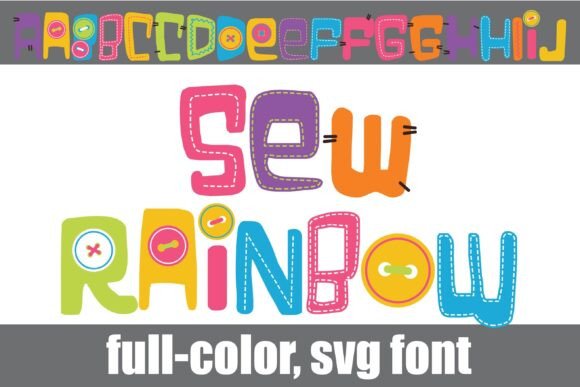
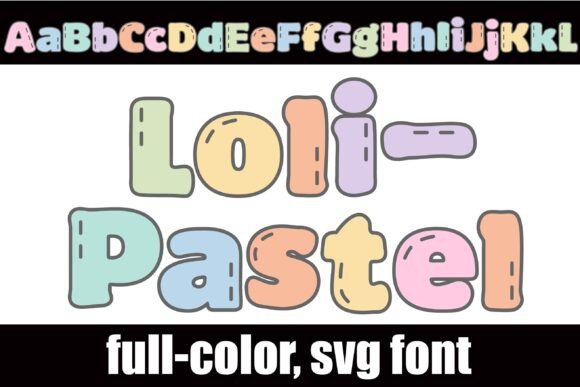
At its core, Loli Pastel is a chunky sans serif font. The letterforms are bold and rounded, giving them a friendly, approachable weight that works well at various sizes. What sets it apart are the pastel color palette and the delicate stitch details woven throughout each character. This isn't a flat, single-color typeface. It's a full-color SVG font, meaning the intricate pastel gradients and stitching are baked directly into the font file itself. You get a complex, textured look with the simplicity of typing.
More Than Meets the Eye: Unlocking Its Full Potential
The initial set of pastel characters is just the beginning. Loli Pastel includes an alternate case of additional colors, accessible through your system's character map or, for crafters, directly within Silhouette Studio's glyph map. This feature effectively doubles your color options, allowing you to fine-tune the palette to match your specific project's needs. For a delightful surprise, typing the greater than (>) and less than (<) glyphs reveals a charming bunny and chick, perfect for seasonal or children's-themed designs.
It's crucial to understand that Loli Pastel is an OpenType full-color (SVG) font. This modern typography format is installed just like any standard .OTF file—on a Mac, you'd typically use FontBook, and on Windows, your preferred font manager or the Control Panel will do the trick. There's one important note for users: color fonts will show as black in non-compatible programs. You might also see them as black when previewing the font in the selection window of programs that do support them. The true test is typing on your document. If the colors appear, your software is compatible. Leading programs like Adobe Photoshop, Illustrator, Silhouette Studio, Quark, and Inkscape currently support full-color SVG fonts, making them powerful design assets.
Where Loli Pastel Truly Shines
This display font isn't for body copy in a novel, but it excels where first impressions and personality are paramount. Think of it as a specialist tool for specific jobs.
- Branding & Logo Design: For businesses targeting a younger demographic, or brands in the confectionery, bakery, toy, or lifestyle space, Loli Pastel can form the heart of a brand identity. It’s perfect for a logo, tagline, or product name that needs to feel joyful and handmade.
- Packaging & Marketing: Imagine this font on a box of artisan cookies, a children's book cover, or a social media graphic for a spring sale. Its inherent charm boosts audience engagement and makes products feel more approachable and fun.
- Digital & Print Projects: From social media graphics and website headers to party invitations, greeting cards, and poster designs, Loli Pastel adds instant visual interest. It's also a fantastic choice for editorial design in magazines or blogs focused on crafts, recipes, or family life.
- Personal & Commercial Crafting: For crafters using cutting machines, this font is a game-changer. It allows for multi-colored, intricate designs on t-shirts, mugs, stickers, and decals without complex layering in design software.
Practical Guidance for Using Loli Pastel
Choosing the right font is about more than just liking how it looks. It's about ensuring it serves the project's goals. Here’s how to approach Loli Pastel practically.
Evaluating Project Fit
Ask yourself: Does the project's tone align with playful, pastel aesthetics? Is the audience likely to respond to a whimsical, youthful style? If you're designing for a serious financial institution, this is not your font. But for a bakery's new cupcake line or a blog about DIY crafts, it's an excellent candidate. Its strength is in creating a strong emotional connection through style.
Font Pairing Strategy
A chunky, colorful display font like Loli Pastel needs a partner that knows when to step back. For readability in longer text, pair it with a clean, neutral sans serif font or even a classic, legible serif font. The contrast allows Loli Pastel to dominate headlines while supporting text remains clear. Avoid pairing it with other highly decorative, script fonts or handwritten fonts, as this can create visual chaos and undermine visual hierarchy.
Readability and Hierarchy
Use Loli Pastel for headlines, subheadings, logos, and short, impactful text bursts. Its detailed stitching and colors are designed to be admired at a glance. Using it for paragraphs would overwhelm the reader and reduce readability. By setting key phrases in Loli Pastel and surrounding text in a simpler typeface, you create a clear focal point and guide the viewer's eye through your design.
Licensing and Final Checks
Before downloading, always review the commercial licensing terms for any premium font. Ensure it covers your intended use, whether for client work, products for sale, or digital distribution. Test the font in your specific software environment. Type out your message, check the color rendering, and experiment with the alternate colors and special glyphs. This hands-on test is the best way to confirm it's the perfect fit for your logo design, packaging design, or next creative project.
In a world of minimalist neutrals, Loli Pastel stands out by embracing color, texture, and joy. It’s a specialized tool that, when used thoughtfully, can elevate a design from simply functional to truly memorable.