Candy Stick X-mas: Your Go-To Festive Display Font
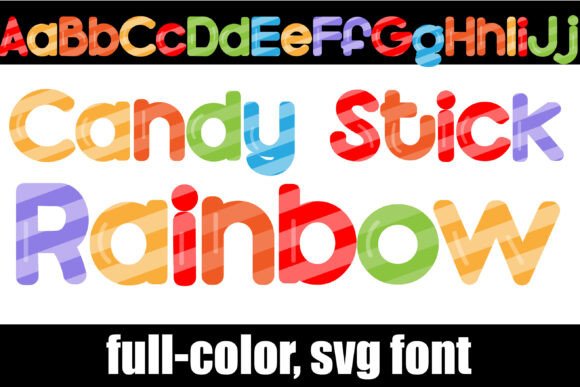
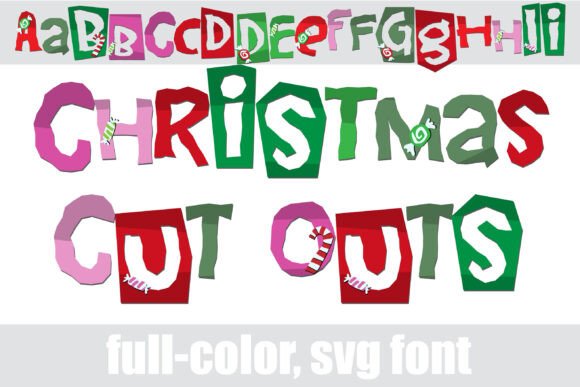
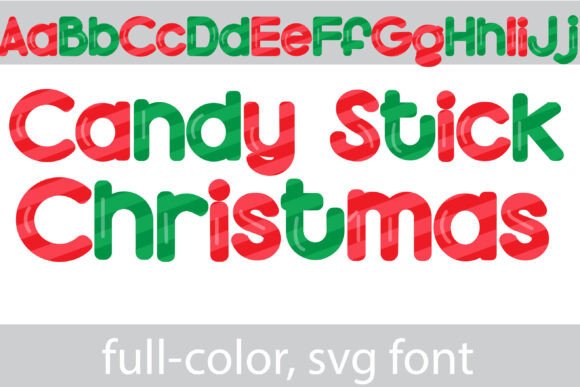
When the holiday season approaches, the visual language of your project needs to shift immediately. You want to evoke warmth, nostalgia, and that unmistakable festive cheer without resorting to overused clipart or generic templates. Enter Candy Stick X-mas, a specialized typeface designed to capture the essence of the holidays through a distinct, sugary aesthetic. Unlike standard black-and-white typefaces, this is a premium font that utilizes modern typography technology to deliver a fully formed visual statement right out of the box. It features a candy cane striped lettering pattern in vibrant red and green, offering a playful yet polished look that instantly communicates a seasonal message.
The defining characteristic of this creative font is its bold, full-color design. It is not merely a standard font with a pattern fill applied later; the stripes are integrated directly into the glyph data. This means the visual integrity of the candy cane effect remains consistent across different sizes and applications. For designers and content creators, this saves a significant amount of time in post-production. You don't need to layer textures or use clipping masks to get that striped look. You simply type, and the design is ready. Additionally, the font includes an alternate version accessible through your system's character map. This version expands the color palette beyond the traditional red and green, allowing you to adapt the typography to specific brand guidelines or non-traditional holiday color schemes, such as blue and silver for a winter wonderland theme.
Practical Applications for Designers and Entrepreneurs
Understanding where a display font like Candy Stick X-mas fits into your workflow is key to maximizing its value. Because this is a decorative typeface, it is best suited for headlines, titles, and logos where visual impact is the priority. It is not designed for long-form body copy, where the intricate stripes might reduce readability at smaller point sizes. Instead, think of it as a tool for high-level communication.
For packaging design, this typeface is a powerhouse. If you are a small business owner creating labels for holiday cookies, hot cocoa mixes, or seasonal merchandise, the Candy Stick X-mas font provides the professional finish needed to compete on the shelf. It pairs exceptionally well with a clean sans serif font for the product details, creating a strong visual hierarchy where the product name pops while the ingredients remain legible.
In the realm of digital marketing and social media graphics, attention spans are short. A bold, festive header using this font can stop the scroll. It works beautifully for Instagram stories announcing holiday sales, Facebook cover photos for seasonal events, or Pinterest pins promoting Christmas tutorials. The immediate recognition of the candy cane pattern triggers an emotional response associated with the holidays, which can increase engagement rates.
Technical Compatibility and Installation
One of the most common hurdles with color fonts is software compatibility. It is crucial to understand that Candy Stick X-mas is an OpenType full-color (SVG) font. This technology allows for vector graphics with color information to be embedded within the font file itself. However, not all software supports this standard equally.
Modern industry-standard software such as Adobe Photoshop, Illustrator, InDesign, QuarkXPress, and Inkscape fully support full-color SVG fonts. If you are a crafter using a cutting machine, you will be pleased to know that Silhouette Studio is also compatible, allowing you to use this font for print-and-cut projects, stickers, and decals.
Installation is straightforward and follows the same process as any standard font file (.otf). Mac users can install it via FontBook, while Windows users can use the Control Panel or their preferred font manager. A critical point to note, however, is how the font appears in your font selection menus. Even in compatible programs, the preview window often displays these fonts in solid black. Do not be alarmed by this. You will only see the true red-and-green candy cane stripes once you have selected the font and begun typing on your canvas. If you type and the letters appear black, it is an indication that your specific software version does not support color fonts, though the text will still be legible in a monochromatic style.
Elevating Brand Identity and Visual Hierarchy
Using a specialized typeface like Candy Stick X-mas does more than just decorate a page; it influences brand perception. Typography is a silent ambassador for your brand. When a viewer sees this font, they immediately perceive a tone that is fun, festive, and approachable. This is particularly effective for brands targeting families, food industries, or lifestyle markets during the Q4 holiday rush.
However, maintaining professionalism requires balance. Because this is a highly stylized display font, using it sparingly is the best strategy. If you use it for every word on a poster, the design becomes cluttered and difficult to read. Instead, use it for the primary headline—such as "Merry Christmas" or "Holiday Sale"—and pair it with a complementary serif font or a clean sans serif font for the supporting text. This contrast creates a visual hierarchy that guides the reader's eye from the festive title to the necessary information.
For content creators and bloggers, this font can help establish a consistent seasonal brand identity. Using the same typeface across your blog headers, email newsletters, and social media profiles creates a cohesive visual experience that builds recognition. Your audience will start to associate that specific visual style with your seasonal content, strengthening your brand's presence.
Making the Most of Your Investment
When investing in a commercial font, you are acquiring a design asset that should serve you for years. To get the most out of Candy Stick X-mas, consider the following practical tips:
- Test Font Pairings Early: Before committing to a layout, test how the candy cane stripes interact with your chosen background colors. While red and green are versatile, they can clash with certain hues. A neutral background—such as white, kraft paper brown, or dark charcoal—usually provides the best contrast.
- Explore the Alternates: Don't forget to access the alternate version via your character map. If you are designing for a corporate client that has strict non-traditional holiday colors, the alternate color options can be a lifesaver.
- Check Licensing: Ensure you understand the licensing terms for your specific usage. Whether you are using it for personal crafting projects or commercial merchandise, confirming that the license covers your intended use is essential for professional integrity.
- Size Matters: This font is a display typeface. It thrives at large sizes. If you try to use it at 10pt for a paragraph, the candy cane details will blur, and the text will become illegible. Keep it big and bold.
Ultimately, Candy Stick X-mas is a specialized tool designed to solve a specific problem: how to quickly and effectively convey a festive atmosphere. By leveraging its full-color SVG technology and understanding its best use cases, designers, entrepreneurs, and hobbyists can create polished, professional, and engaging holiday projects with ease. Whether you are designing a logo for a seasonal pop-up shop, creating invitations for a Christmas party, or crafting decals for a small business, this typeface offers a distinct personality that standard fonts simply cannot match.